

Enhancing Filters
Sometimes you want to boost the colors in your images. Saturated fall colors always look better as do colorful red rock canyons. These days that's really easy to do in the computer, so enhancing filters aren't used nearly as much as they used to be. But if you don't like messing around in software, or if you need to send or share pictures right away before you have time to develop them in the computer, then filters such as these come in handy.
This picture is of the Perito Moreno Glacier in Argentina. If you've ever seen a glacier you're familiar with the deep, nearly otherworldly blue color of the ice. The problem I was having was that the image in my viewfinder wasn't nearly as saturated as what I was seeing with my eyes. And the image in the LCD wasn't any more exciting (though you should never judge your pictures by what you see in the LCD). Probably something to do with optics, lens coatings, whatever.
By adding a Singh-Ray LB Color Intensifier the image in the viewfinder and the LCD looked a lot closer to what my eyes were seeing. Same with the images once I saw them on the computer.
These two images have not seen any processing other than what Lightroom's raw converter does to them to allow for display. The picture with the filter is much closer to the color I remember.
This particular enhancing filter cuts about 1 1/3 stop of light. You can also get this filter in combination with a polarizer from Singh-Ray.
Nikon D300, 80-200mm f/2.8 at 170mm, f/10. On a tripod (of course).
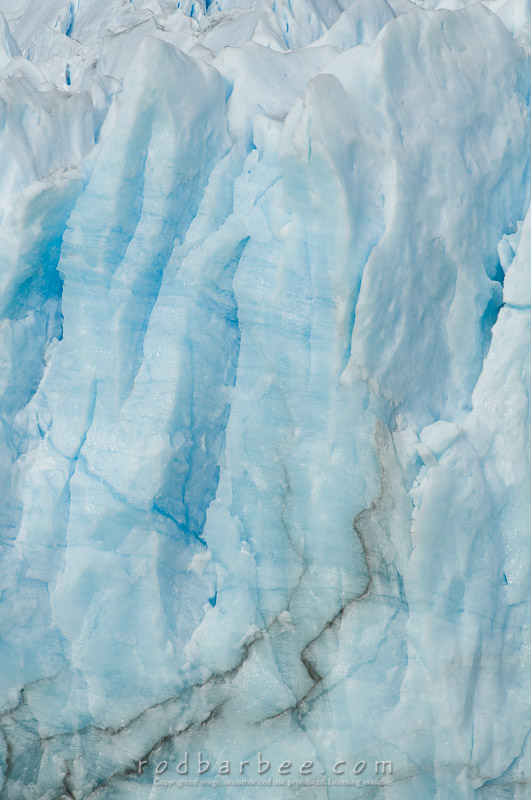
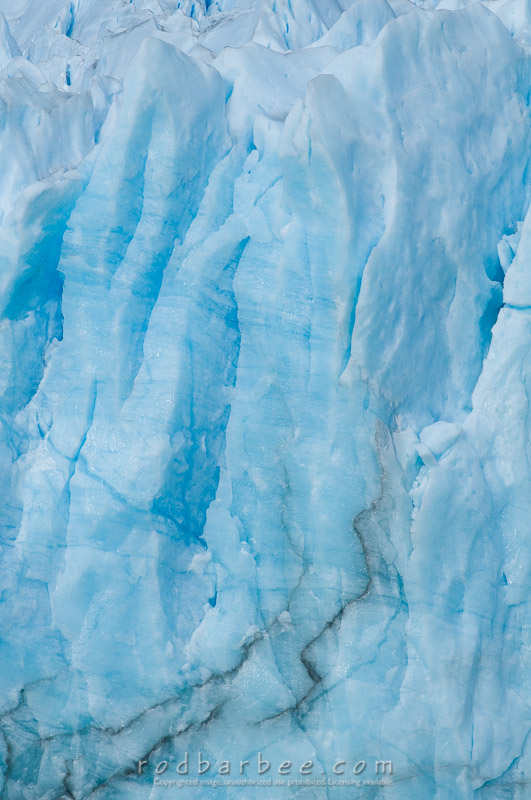
Perito Moreno Glacier