

The Turning Gate has released the final puzzle piece of their CE4 suite of Lightroom Web Module plug-ins. And it’s a doozy. (not sure if that’s how you spell doozy. Doozie?)
Anyway, it’s here: the TTG CE4 Client Response Gallery!
If you’re a photographer working with clients that need to make selections and give you feedback, this gallery facilitates that. No longer will your clients need to write down file names or send you an email saying they want to use “the image with the thing in the foreground and the whats-it on the side”. They can actually place a check mark on the image and even open a response pane for each image where they can choose any options you’ve configured. And they can add comments.
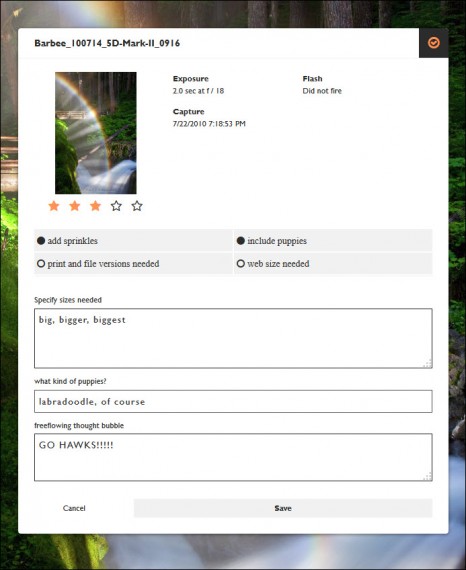
After clients make their choices and give feedback, an email form will be sent to you with lists of chosen images. And not just all chosen images, you’ll get a list for all the images where Option A was selected and a list where Option B was selected, etc.
There will also be links to each selected image so you can go directly to them on your web site to see the chosen images.
So if you’re doing weddings, or events, or you’re taking pictures for a client’s web site or brochure, really any job that will require a back and forth between you and the client, then the TTG CE4 Client Response Gallery is the tool.
But that’s just the tip of the iceberg of what can be done.
The CE4 version of the Client Response Gallery represents a major step forward for The Turning Gate.
Beginning with the CE3 Cart, TTG began using a SQLite database to store product and pricing information. This would be shared with the online gallery.
When the CE4 Web Gallery plugin versions came along, this concept was expanded into TTG-BE, the back-end that now handles processing contact forms, and manages aspects of Publisher and Cart as well as the Lightroom generated gallery and autoindex templates that serve for albums, album sets and front facing pages such as the search results page and the cart.
CE4 CRG takes this a couple of steps further.
CE4 CRG now interacts with the new Client Response component of the back end to save all client selects and feedback to a database. And the information is easily accessible to you through the admin page.
Combine the CRG with Publisher and TTG-BE and you can now create and manage clients in the back end. This means that for the first time, clients can log into their gallery, make some selections and add feedback. Log out, and come back later to pick up where they left off. This is something that CRG users have been requesting for years, but since Lightroom doesn’t output a database to store client information, it’s been impossible. Until now.
Past versions of TTG Client Response Gallery have drawn glowing praise by the likes of Scott Kelby. The CE4 version is a giant leap forward from the old versions. If you’re a photographer dealing with clients, this is the plug-in for you.






Rod,
As a user of CRG3 for a few years I was very happy with the way this worked with my clients… I have updated one of my machines to LR6 and CRG4. I am disappointed that I can’t seem to use the previously made gallery templates I have labored over in CRG3. Also, I can seemed to get the Form-to-Email section set up. Is this featured removed from CRG4? Do I have to purchase and use Publisher and BE now to do this? I am a bit frustrated as the previous version worked great but I cannot figure out all the changes in CRG4… I am a photographer and not a computer programmer… sometimes all of the ‘website building’ setups on the backend of this software is a bit daunting. I am hoping you can help me sort this out. I am also going to post this question to TTG forums. Thanks,
Tony
you can still use your CE3 plug-ins with LR6
But the user templates you made in CE3 are not compatible with CE4. It’s always been this way between TTG versions.
CE4 CRG does not use Form-to-email. It uses TTG’s own mail form. You need to install ttg-be (which comes with CE4 CRG).
The reason CE4 CRG may seem a bit more complex is because it is. There were many feature requests, features that weren’t possible with just Lightroom alone. So Matt and Ben developed ttg-be, the back-end to support a database.
Face it, if you’re a photographer that needs to be on the web you have two choices, learn about about the web or hire out your website design and management.