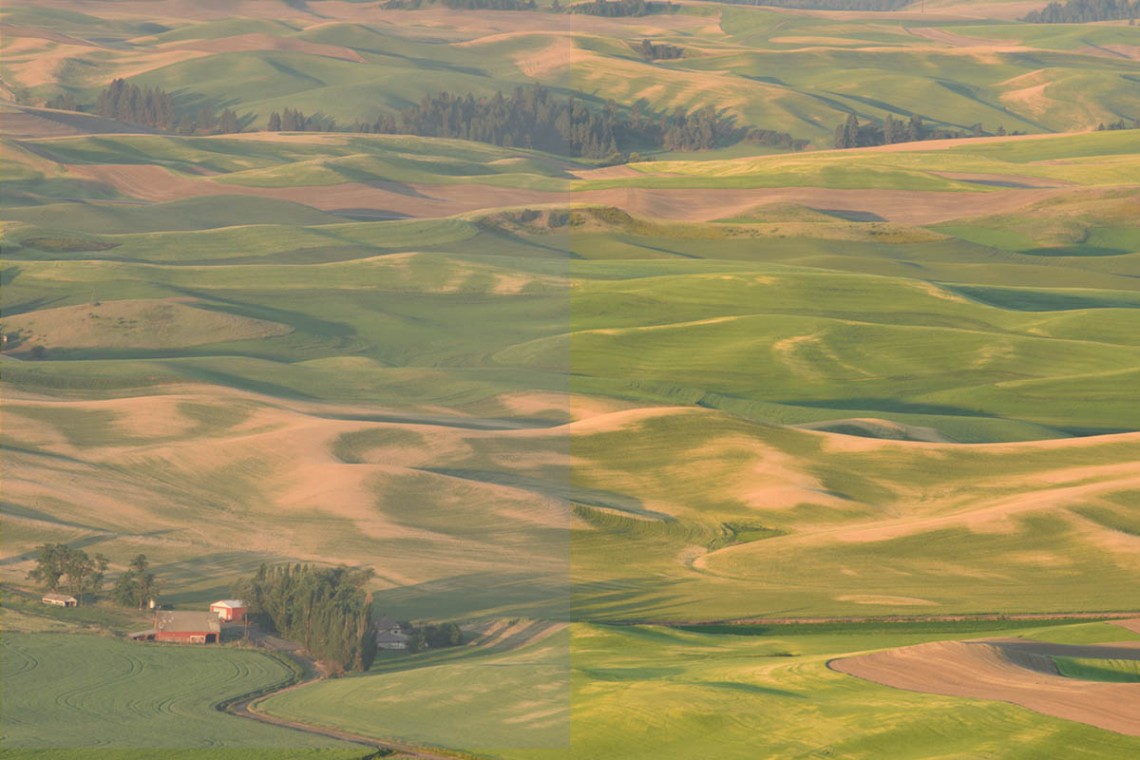
My recent Palouse trip was the first opportunity I’ve had to shoot with my D810 since Lightroom 6/CC came out. The first thing I noticed was that in Lightroom my images looked really flat and lifeless, like there was some sort of haze filter applied to all the images.
What happened is that the newest version of Camera Raw seems to be automatically applying a calibration profile named “Camera Flat” to all the images.
Images previously made with my D810 had the “Adobe Standard” profile applied and that always looked ok. At least it was a good starting point. That option no longer appears on newly imported images.
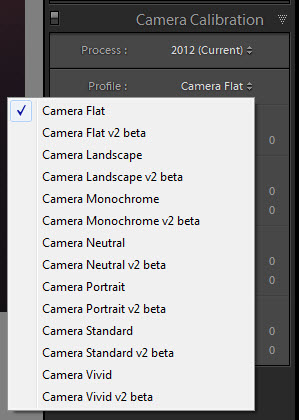
In Lightroom’s Develop Module, if you look under the Camera Calibration control pane you’ll see options to apply a Process and a Profile. For my D810, the Camera Flat profile is automatically used. This looks awful.
Your options here may be different, depending on the camera model you own.
Fortunately, as you can see, there are other options. Camera Landscape often worked well. Sometimes it went a little overboard so I tried Camera Standard. Camera Vivid produced some…vivid…results. Not the best choice for all images.
Camera Standard seems to be a good compromise so I’ve set that as the default that will be applied upon import of D810 images.
To change the default, in the Develop module go to the Menu > Develop > Set Default Settings… and click Update to Current Settings.
If you want to learn more about setting, changing, or applying default settings, take a look in Victoria Bampton’s Lightroom CC/6: The Missing FAQ starting on page 305.
What? You don’t own this book yet? For shame. Get thee now over to www.lightroomqueen.com and buy this book!